Question
Can I do signings by video (RON)?
Only where your state allows it, once you've added what it requires. The video signing runs on your RON platform; here a job By video is booked, priced to your state's limit and closed out.
General information, not legal advice
This page explains how Hand & Seal works. Your state’s law, and your commissioning authority, decide what you must do — when in doubt, ask them or a lawyer.
Yes — where your state allows it, once you've told Hand & Seal what your state requires for it. The video signing itself happens on your remote online notarization (RON) platform, which keeps the recording and the electronic journal. Hand & Seal books the job, prices it, closes it out and puts it in your books — and refuses a job by video wherever, or whenever, your state doesn't allow one.
See what your state allows, and turn it on
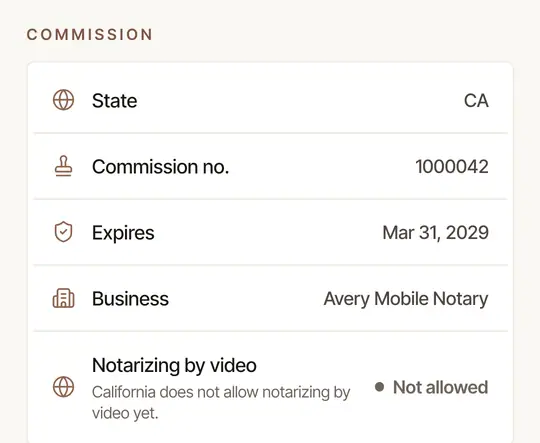
On the web, open Settings → Account and find Notarizing by video, under your commission.
- Where your state doesn't allow it, the row says so — Not allowed; Not yet, where a law has passed but can't be used yet; or Not confirmed, where the rules built in can't yet say — with the reason.
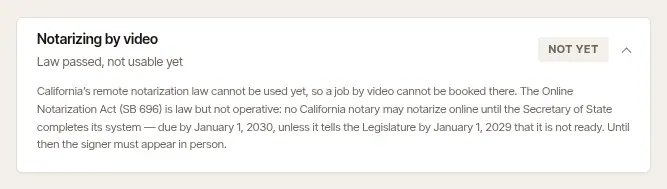
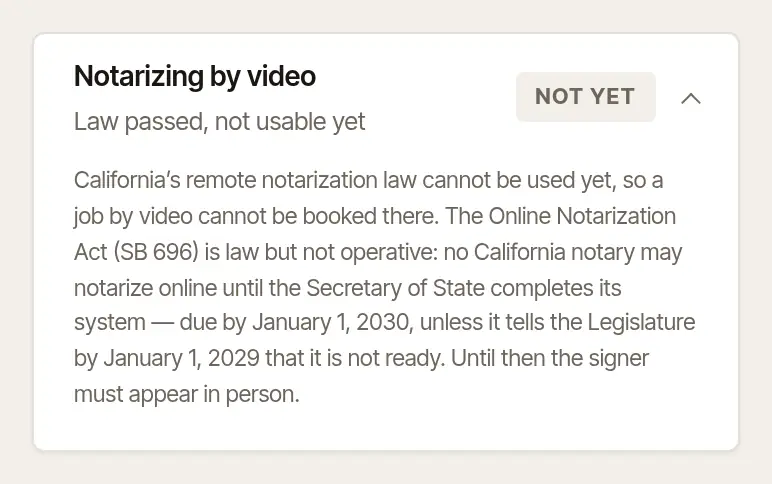
- Where it does, the card says What you need first (a notice, a registration or approval, or a separate commission, depending on the state, in its own words), What you may charge, what your state asks of The recording and The journal, and anything to Keep in mind. Tick I notarize by video (remote online notarization), add the date the form asks for — the day you filed the notice, or the day you were registered, approved or authorized — and its number where it has one, when it Expires (blank: with your commission), and Your fee for one act by video (blank: your usual fee, within the limit). Choose Save. The card says Ready once nothing is missing.
On the phone, More → Settings → Commission → Notarizing by video shows where it stands — and, where your state allows it, opens this page on the web.
Book and close out a job by video
- On the web, New job → Where → By video — the box is there once you've turned notarizing by video on; if something is still missing, it says what under the box. Add Where the signer is if you like: you must be in the state that commissioned you; where the signer may be depends on your state — Keep in mind, on the Notarizing by video card in Settings → Account, says what the rules built in have for yours.
- On the phone, tap + for a new job, then By video beside In person.
A job by video has no drive and no printing, and each act is held to your state's limit for acts by video. At close-out its journal lines index the RON platform's electronic journal — no book page, and no thumbprint — and each line offers ID shown by video — credential analysis and identity proofing beside the other ways of knowing a signer that your state's rules list: credible witnesses, or your personal knowledge. Which of them your state accepts for an act by video is your state's to say.
Refused on a day your authorization doesn't cover
A job by video can't be booked for a day before your authorization starts, or after it expires. Renew it and update Settings → Account.
General information, not legal advice
Whether you may notarize by video, what you must hold or file first, what you may charge, and how the recording and the electronic journal are kept are set by your state — and they change as states pass new laws. Hand & Seal applies the rules built in for your state, but that is general information, not legal advice: your state's commissioning office, its notary handbook or a lawyer has the last word.
Was this helpful?
Still stuck? Contact support — a person reads every message and answers by email.