Guide
Quiet your phone at signings
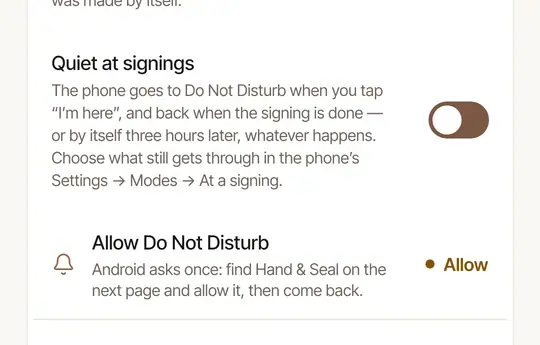
On Android, Quiet at signings turns on Do Not Disturb when you tap I'm here, and off when the signing is done. On an iPhone, a Focus you set up once does it. The screen stays on at the table on both.
A phone that rings across the table in the middle of a loan signing is the last thing you need. On Android, Quiet at signings silences your phone at the door and brings it back when you're done — you don't have to remember either. An iPhone app can't silence the phone itself, so there a Focus does it, in two taps at the door.
Set it up
Open More → Settings → Notifications and switch on Quiet at signings.
Allow it, once. The first time, Android opens its page for apps that may turn on Do Not Disturb (Modes access on the newest Android, Do Not Disturb access on older ones). Tap Hand & Seal and allow it, then go back to the app.
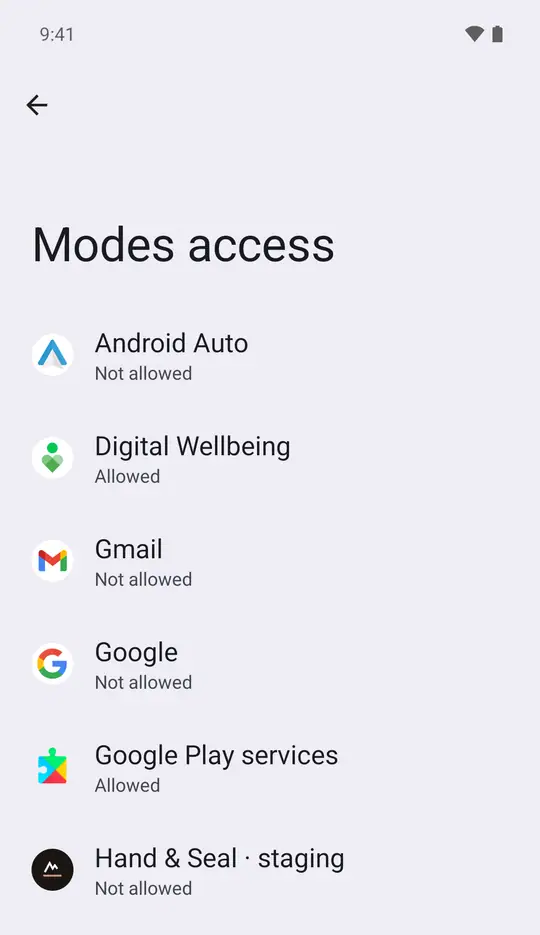
Check Settings. Until Android allows it, Settings shows Allow Do Not Disturb under the switch — tap it to open the same page again. Once allowed, the row goes.
There is no switch to turn on: you make a Focus once, in your iPhone's own Settings. The app keeps the steps where you'll find them again — More → Settings → Notifications → Quiet at signings.
Make a Focus called Signing. Open your iPhone's Settings → Focus, tap +, then Custom, and name it “Signing”.
Choose who may still reach you. Under People, allow no one — or only family, for emergencies.
Let Hand & Seal through. Under Apps, allow Hand & Seal, so “time to leave” for your next job still reaches you.
What happens at a signing
- You tap I'm here (or it's marked by itself as you park, with Steps by themselves on): your phone goes quiet.
- You tap Signing done, close the signing out, or cancel it: your phone is back as it was. Undoing I'm here brings it back too.
- Three hours after I'm here, whatever happens, it ends by itself — a phone is never left silent because a signing wasn't marked done.
The app's quiet time is an Android mode called At a signing. To let some calls through — your family, or anyone who rings twice — open your phone's Settings → Modes → At a signing and choose who and what may still reach you.
- At the door, turn the Focus on. Open Control Center, touch and hold Focus, tap the three dots beside Signing, and choose Until I leave this location.
- When you drive off, it ends by itself.
The app doesn't turn the Focus on or off for you: tapping I'm here or Signing done leaves it as it is.
The screen stays on at the table
From I'm here until Signing done, while the signing is open in the app, the screen doesn't dim or lock: its steps and the journal are a glance away, not an unlock. This happens on both phones, whether or not your phone is quiet.
Good to know
Quiet at signings needs Android 10 or later. On an older Android phone the switch isn't shown.
Was this helpful?
Still stuck? Contact support — a person reads every message and answers by email.