Question
Does the app work without a signal?
Mostly, yes. Today, Jobs, Books and your drives open from what was last loaded; steps, photos and receipts wait on the phone and go when you're back; drives are still recorded.
Yes, for what you do in the field. Signings happen in basements, parking garages and hills, so the app keeps your day on the phone and holds on to what you do until the signal is back.
When there's no connection, a line across the top says so, and when the screen was last brought up to date:
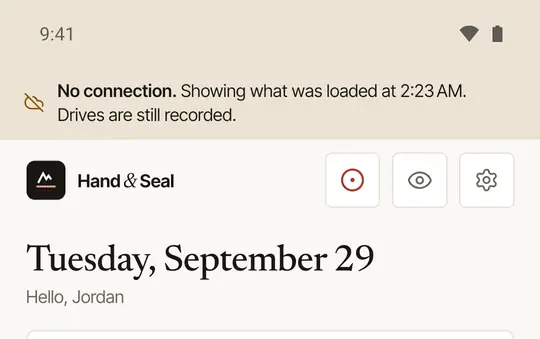
What still works
- Today, Jobs and Books open with what was last loaded — your signings, their addresses and times, what's owed. The phone remembers them for about a week.
- Drives are recorded as usual, and go up to your mileage log once you're back.
- Steps at a signing — On my way, I'm here, Signing started, Signing done — are kept with the moment you tapped, marked waiting to send, and sent in order when the signal returns. The home-screen widget's steps too.
- Proof photos and receipts you snap are kept on the phone and sent later.
- Journal lines you write at the table are kept on the phone until you close out.
What needs a connection
- Closing out. With no signal the app says Your journal lines are safe on this phone — close out when you are back online.
- Your journal index. It isn't stored on the phone — signers' names and ID details stay on our servers — so open it with a connection.
- Sending an invoice or a receipt, exporting your mileage log, and anything new from the platform, such as a client's request.
- The business pages — the calendar, clients, invoices, taxes and business settings the app shows from the web — say These pages need a connection.
Good to know
Anything waiting to send goes up by itself when the signal is back, or the next time you open the app. Stay signed in until it has gone: signing out clears what the phone keeps.
Was this helpful?
Still stuck? Contact support — a person reads every message and answers by email.