Question
The distance on a job looks wrong
How a job's distance is measured, why it may start from the middle of your town, how to measure it again, fix the address, or type your own figure — and why it's an estimate until the invoice.
A job's distance is measured by road, one way, from near your home base to the job's street address. It prices the travel fee (from your travel zones) and — doubled — the round trip for your mileage. When it looks wrong, it's usually where it starts from.
It starts at a spot a half mile to a mile from your street address, chosen for you once and kept — never at your door. Every price you send is a distance, and your page shows your travel fees, so prices measured from your door would let anyone who sends a few orders work out where you live. From that spot, a price stays within a mile or so of door to door, and none leads past it. Your Leave by times still start at your door.
Until you close the job out, the distance is an estimate, and so is the travel fee it prices: the job, your client's page and the phone say estimated beside them. Whenever the distance is measured again, the travel fee follows it. At close-out, travel is priced from the final miles, and the invoice names their zone, or the miles themselves when you typed or recorded them — and an invoice, once made, doesn't change.
Look at where it's measured from
On the web, the job's Where says how far it is and from where.

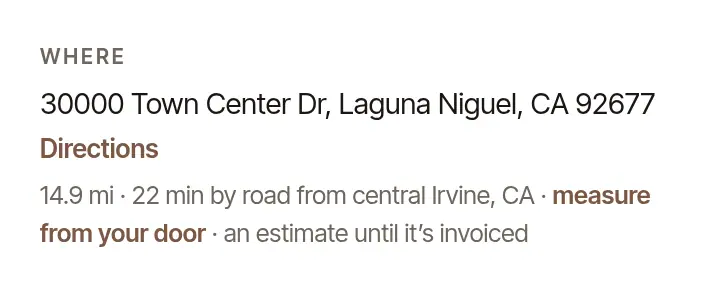
- “from near home base” — from the spot near the street address you saved.
- “from central …” — you haven't saved a street address, so it's measured from the middle of your town. A few miles either way is the usual result. add your street address takes you to where to add yours.
- “(town to town)” — an estimate, from the middle of your town to the middle of theirs; the street isn't looked at. Inside your own town that figure would say nothing, so it reads within the town, with no miles. Two things put it there:
- A request from your page whose drive couldn't be measured by road. The job takes the estimate your page showed the client, and prices its travel from it — so your total and their estimate agree. The banner at the top of the job says The distance is an estimate: choose Measure by road, or type the miles, and that replaces it.
- A road measurement that is no longer kept. One is kept for 30 days, under the map service's terms: a signing still ahead is simply measured again, but one further back than that shows this estimate instead. Its price doesn't change.
Closed out on an estimate, the invoice keeps the travel fee the job has and says the miles are “about” — or “within” your town. Where your state limits a travel fee by the mile, an estimate prices no travel: the job says so, and asks for the miles.
On the phone, it's under the job's Miles: “by road · … one way ×2”.
Add your street address
Open Settings → Account. Under Your practice, fill in Street address. It's private: clients and companies see only your town.


Choose Save. Your signings in the next 60 days that were measured by road are measured again from near your address, and their travel fee follows the new distance — requests and booked signings alike, as each is an estimate until it's invoiced. The note under the form lists any whose fee changed. A signing already invoiced (billed in advance) keeps its invoice as it is.
Not the phone's Home location
The phone's More → Settings → Mileage & trips → Home location is where the phone's recorded drives start and end, so the drive home from a job is recognized. It doesn't change how a job's distance is measured — that's the street address above.
Measure one job again
A road closed, or the first measurement was off? On a requested or booked job:
Under What it actually pays, choose Measure the drive again. It's there for a job measured by road.


Open the job and tap Measure the drive again, under Miles. (Once a drive has been recorded for the job, Miles shows the recorded miles instead.)
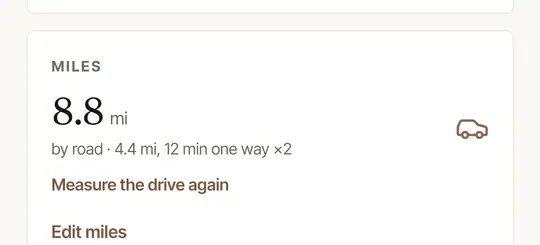
The travel fee follows the new distance, priced again from your travel zones — a travel fee you typed yourself stays as it is, and a flat fee has no travel to change. If you billed the job in advance, the job says so: measuring again changes the job's estimate, never the invoice. To bill the new figure, void the invoice and make a new one. Measuring again can say “That address could not be measured by road — type the distance”, or, on a very busy day, that enough drives have been measured today: type the distance instead (below).
Fix the address, or type your own figure
On the web, choose Edit on the job:
- The address is wrong or incomplete — correct it (a street number and the town make all the difference). A new address is measured again when you save.
- You know the distance better — type it in Miles, one way. Your figure is used instead of a measured one.
A job with no distance at all — a request whose address the map couldn't place, or one farther than you travel — shows No distance yet, so no travel fee at the top: choose Measure by road, or type the miles and choose Price the travel. A request resting on a town-to-town estimate has the same two choices under The distance is an estimate.
A finished job is a record
Once a job is closed out (or cancelled), it can't be measured again or re-priced: its invoice prices travel from the final miles and stays as it is. Close-out prices travel from the job's distance — or, with one tap, from the drive your phone recorded there (Close out a signing and get paid). The miles you actually drove are in your mileage log — Add a drive the phone didn't record says how to add one the phone missed.
Was this helpful?
Still stuck? Contact support — a person reads every message and answers by email.