Question
A drive wasn't recorded
The usual reasons a drive is missing from your mileage log — most often your working hours — what to change for next time, and how to add the miles now.
First, look in More → Mileage: a drive the phone couldn't place waits in To file, and All drives shows every drive, filed or not — it may be there under another job. If it isn't, here's why, most likely first.
On an iPhone
A drive recorded while the iPhone was locked joins your log once the iPhone has been unlocked — at the latest when you open the app. Looking on the web? Open the app on the iPhone first.
Why it wasn't recorded
It was outside your working hours
This is the usual reason. With Record drives set to During my working hours, drives are recorded during your Hours on the web, and on the way to and from confirmed signings — from well before you'd leave for each one until well after it ends. A drive on a day off, or in the evening, with no signing near it, isn't recorded: that's on purpose, so your personal driving stays yours.
On a day the phone noticed driving outside your hours, Today says so in a faint line, until your hours begin again: Drives outside your working hours aren't recorded by themselves. Its Working hours link opens the phone's Working schedule, which shows your hours.
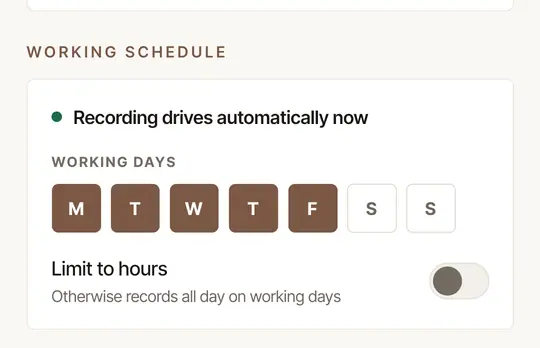
For next time: add the time to your Hours — Change your hours, under the phone's Working schedule, opens them in the app — or choose All the time in Settings → Mileage & trips → Record drives. For a one-off, tap Record a drive at the top of Today as you set off: that records any time. Your Hours also decide when clients can book you.
Automatic recording is off
If Settings → Working schedule says Automatic recording is off — you press Record, Record drives is set to Only when I tap Record: the phone only records the drives you start yourself — with Record, Navigate or On my way. Choose During my working hours in Settings → Mileage & trips → Record drives — see Record your drives automatically.
Your plan has ended
Recording drives is part of your plan. When a trial or a subscription ends, the phone stops recording — by itself and when you tap Record — and Mileage says Drive recording is paused — your plan has ended. Your mileage log is safe. Drives recorded before it ended still go up, and everything in your log stays there to read, file and export. Subscribe on the web (Settings → Billing), and the phone records again. See Subscribe, change your card or cancel.
A permission was taken away
Setup, at the top of Settings, says Finish setup to record drives automatically when something it needs is missing, and lists it. Tap the button beside each to put it right.
It lists Background location, Physical activity or Battery optimization off (Battery use: Unrestricted on Android 16). Google Location Accuracy is listed too while it's off: drives still record without it, but use more battery.
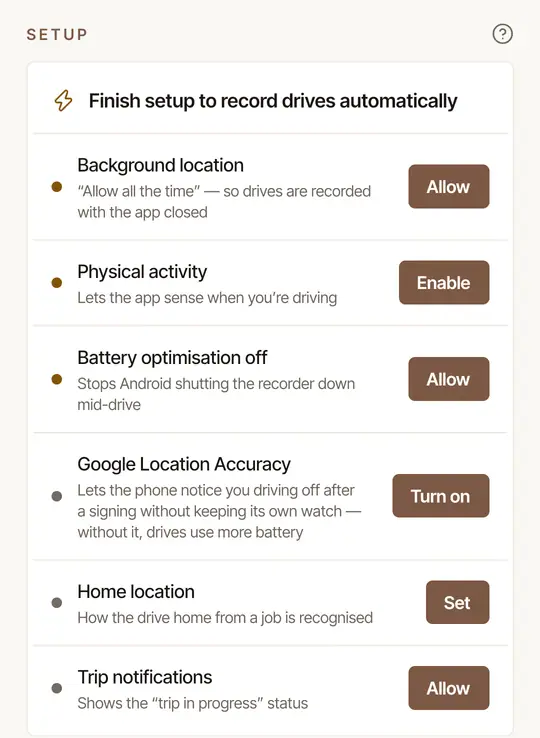
Any of these can be on the list:
- Background location — location set to Always, so drives are recorded with the app closed.
- Precise Location — without it every position is kilometers out, and no drive can be measured.
- Motion & Fitness — how the iPhone tells a drive from a walk.
- Background App Refresh — it lets iOS wake the app when you drive off.
Each button asks the iPhone for it, or opens Hand & Seal's page in the iPhone's Settings. There, Location has Always and Precise Location, and Motion & Fitness and Background App Refresh each have a switch.
Low Power Mode pauses Background App Refresh: while it's on, a drive may not be noticed. Turn Low Power Mode off, or tap Record a drive as you set off.
If your phone's Location is turned off altogether (Location Services, on an iPhone), no app can record where you drive — this one included.
The phone never saw you driving
A recording becomes a drive only once the phone has measured driving speed, so a walk is never logged. The flip side: a very short or very slow hop — across a car park, or a crawl of a few hundred feet — may not count. And now and then the phone simply doesn't notice a drive begin. When one leg of a signing was recorded but the other wasn't, the missing leg is usually added for you as an estimate once a later drive shows you got home.
The app was stopped, or you were signed out
Swiping the app away is fine — it keeps recording, and it starts again by itself after the phone restarts. But if it was closed with Force stop in Android's settings, nothing is recorded until you open the app again.
Between drives, swiping the app away is fine: iOS wakes it when you drive off from where the car was parked. Swiped away during a drive, though, the recording stops. It picks up again if iOS wakes the app within half an hour — once the phone has moved a good way — and otherwise the drive ends where it stopped; either way, part of it may be missing. Leave the app open, or in the background, while you drive.
After the iPhone restarts, unlock it and open the app before you drive. Nothing can be recorded until the iPhone has been unlocked once, and opening the app makes sure it's watching for drives again.
While the app is swiped away, or the iPhone is in Low Power Mode, the phone may not hear that your jobs changed until the app next runs. Booked a signing outside your hours on the web? Open the app before you set off.
A drive cut short — the app stopped, or the phone switched off on the way — keeps what was recorded before. Signing out stops recording on that phone until you sign in again.
Add the miles now
For a drive to or from a signing:
Wait for To file, or open the job. Three hours after a signing with no drive filed to it, Mileage → To file lists the signing: swipe right to add its round trip on the quoted route, or left for No drive. Or open the job itself and find Miles.
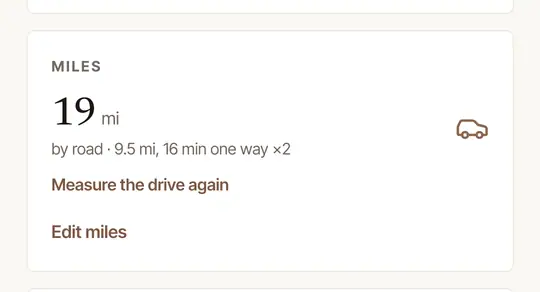
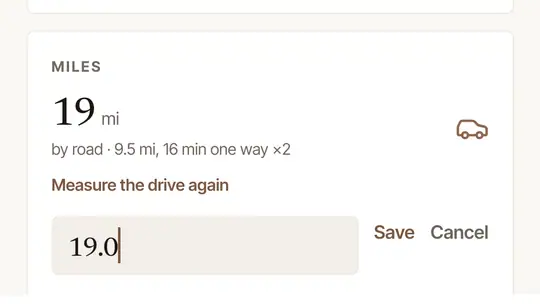
Tap Edit miles, type the round-trip miles, and tap Save.
A drive that wasn't for a signing — an errand, say — is added on the web: Add a drive by hand on Mileage (Add a drive the phone didn't record). Next time, tap Record a drive as you set off.
Still missing?
If Setup says Ready to record drives automatically, the drive was inside your working hours, and it isn't anywhere in All drives, write to us. Say which day, roughly when, and where from and to.
Was this helpful?
Still stuck? Contact support — a person reads every message and answers by email.