Guide
Set your fees
What you charge for each act, for travel by distance, printing, waiting and after hours, and when a signing falls through — held to the limits your state sets, from a day you choose.
General information, not legal advice
This page explains how Hand & Seal works. Your state’s law, and your commissioning authority, decide what you must do — when in doubt, ask them or a lawyer.
Your fees price every signing for you: the ones you book, the requests clients send from your page, and the orders companies send. You set them once in set-up (Step 4), and change them in Settings → Fees & rates whenever you like.
Change what you charge
Open Settings, then Fees & rates. On a phone-sized screen, Settings is under More. What you charge shows the prices in force now, and the day they started.
Set a fee for each notarial act. The acts listed are your state's: Acknowledgment, Jurat and the rest, as your state names them. Where your state sets the most you may charge and we have established it (set-up starts each fee there), a fee over it is refused when you save, with a line saying what your state allows and how far that rule has been checked. An act your state limits by the page is marked (per page): its fee is your fee for one page. Under a fee, small print gives what your state says about that act. Where we have not established an act's limit, it says so there, and nothing is refused for that act: check your state's fee schedule before you charge. If you hold more than one state's commission, the acts listed are each of your states': those of the state whose commission runs longest first, then any act only another of your states lists, which says so under its fee (“Of your states, only Maryland lists this act”). What a state says about an act is given under it with the state's name. A fee for an act the first state lists is held to that state's limit when you save, as it would be with one commission. A fee for an act only your other states list is refused only when it's over the limit of every one of them that lists it, with the line of the one whose limit is highest. Where a fee is over the limit of another of your states that lists the act, the line under it gives that limit and says a signing there is charged no more than that state allows — each signing is priced under the commission of its own state. When another commission of yours ends, an act only its state listed leaves the form, and its fee goes when you next save.
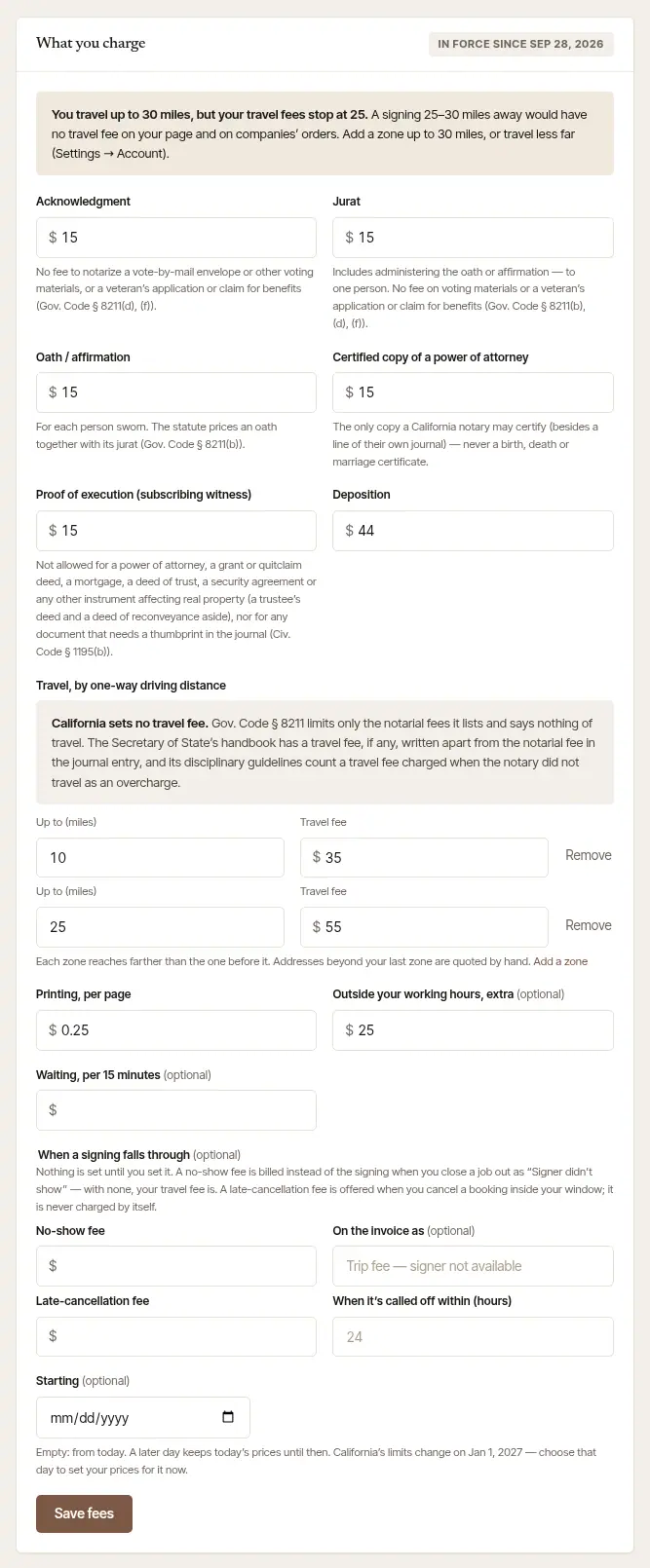

Set travel by distance. Under Travel, by one-way driving distance, each row is a zone: Up to (miles) and its Travel fee, each reaching farther than the one before. The zones' fees start empty — no travel price is suggested (in set-up, the first zone reaches as far as you travel) — and saving needs at least one, with a fee of $0 if you charge nothing for travel; a zone left without its fee, or its miles, says so under it. The distance is the drive to the signing, one way, measured from a spot near your home base — never your door, so no price gives away where you live (Who sees my home address?). An address beyond your last zone is quoted by hand. Until a job is closed out its distance — and so its travel fee — is an estimate, and follows the drive whenever it's measured again; close-out prices travel from the final miles, and the invoice names their zone, or the miles themselves when you typed or recorded them. Add a zone puts a new row after the last; Remove beside a zone takes it out (the last one left can't be removed).
A note above the zones gives what your state says about travel fees. Where your state limits a travel fee by the mile — the IRS mileage rate for each mile there and back, plus $5 in Maryland — the note says every job is held to it: a zone's fee over the limit for the zone's distance is refused when you save, and each signing's travel is charged at no more than the limit for its own miles, so a nearer address in a zone can cost less than the zone's fee. The job's travel line then says whose maximum it is. Nevada limits a travel fee by the hour instead — $15 an hour for travel between 6 a.m. and 7 p.m., $30 an hour between 7 p.m. and 6 a.m., two hours at the least — so your zones save as you set them, and each signing's travel is charged at no more than the limit for its own drive and hour: a zone's fee that fits an evening signing can be charged at less by day. The note says how the hours are counted. With commissions in more than one state, the note gives each state's words. Your zones are held to the limit of the state whose commission runs longest when you save, and each signing's travel is charged at no more than its own state's limit for its miles. If you travel farther than your last zone reaches, a note at the top says so: a signing in between is beyond your last zone, so no travel fee is worked out for it, your page shows no estimate for it, and its travel is yours to quote by hand. Choose Add a zone and make it reach as far as you travel, or travel less far (Settings → Account, How far you travel). Until then, Today's Needs you says it too, with Add a zone.
Set the extras. Printing, per page is charged for each page you print. Outside your working hours, extra is optional, and starts empty: when set, it's added to a signing that starts outside the hours in Settings → Hours. Waiting, per 15 minutes is optional too: it's charged only when you add waiting minutes at close-out — and on a company's flat-fee order, only when you tick there that the company agreed to pay it.
Say what a signing that falls through costs, if you charge for it. Under When a signing falls through (in Settings, not in set-up), all of it is optional — nothing is set until you set it:
- No-show fee is billed instead of the signing when you close a job out as Signer didn't show on the phone. On the invoice as is what the bill calls it; left empty, it says “Trip fee — signer not available”. With no no-show fee, a no-show bills your travel fee.
- Late-cancellation fee and When it's called off within (hours) — 24 is common — go together. When you cancel a booking that close to its start, the phone's Cancel sheet (and the job's Cancel job on the web) offers Charge your late-cancellation fee, unticked: tick it when they called it off. It goes on an invoice of its own, which you send like any other. A deposit you took yourself and keep counts toward it — only the rest is billed, never both. It isn't offered when the deposit came through your page (a cancel gives that back), or when an invoice the cancel keeps already bills the job — one with money paid on it or a bank transfer on its way, a draft, or one that bills other signings too. An open invoice of this signing alone, with nothing paid on it, is voided by the cancel, and the fee goes on its own. When the client or the company calls a signing off themselves — from their own page or their desk — your late-cancellation fee isn't charged for that one: it is charged only when you cancel a signing yourself. Where you had accepted the signing and it's called off inside your window, the notification and the email that tell you say so, with how long before it was — unless your fee is $0, an invoice the cancel keeps already bills the job, or the signing carries a deposit taken through your page. That deposit follows its own rule, not this fee's: Ask for a deposit when clients book from your page.
Both show on your public page's price list once set, so nobody meets them for the first time on a bill.
Choose when the new prices start, and save. Leave Starting empty and they start today. Choose a later day and today's prices stay until then; the card then says New prices start on that day. When your state's limits are about to change, the line under Starting gives the day, so you can set your prices for it ahead. Then choose Save fees. From 60 days before such a change, Today offers it in one tap too — a button that begins Use, with the new limit and its day — keeping everything else as it is; see Plan your day on Today.
Good to know
- Signings already quoted keep their price. New prices apply to what you book from then on. A past invoice never changes because you changed your rates.
- One signing, a different price. Any fee can be waived or changed on the signing itself, when you book it or close it out. See Close out a signing and get paid.
- In a business with several notaries, the owners set the prices, and every signing there is priced at them. An employee sees What the business charges instead of the form.
Show or print your fee schedule
Some states have a notary show her fees: a schedule posted, or handed to each person when she works away from her office. Settings → Fees & rates has one made from the fees you saved.
Choose Open your fee schedule — or your fee schedule, at the top of the form.
Read the sheet. Your name as clients see it, the state that commissioned you, each notarial act you have a fee for, and travel as you charge it. It follows your fees: change one, and the sheet changes with it.
Show it on the screen, or choose Print or save as PDF. It prints on US Letter, black on white, with nothing of the app around it.
If you hold commissions in more than one state, each has a sheet of its own on the web: choose the state above the sheet. Each lists the acts of that state's list you have a fee for, in its own words, and gives every fee at no more than that state's limit, where the limit is a figure for the act or, for travel, by the mile: the most a signing there is charged in person. Where a state limits travel by the hour, as Nevada does, a zone's fee is given “up to” itself; a signing is charged no more than that state's hourly limit for its own drive and hour. In the phone app, More → Fee schedule shows the sheet of the commission that runs longest.
Beside the sheet, a card named for your state — What Missouri asks, say — gives your state's own rule about showing or telling your fees, with the law it comes from, where your state has one. How it is made says the size of type the sheet is set in. Where your state names a least size of type for a fee schedule, every part of the sheet is set in it or larger; elsewhere it is 12-point. The same rule is in Settings → State rules, under Showing and telling your fees, with a link to the sheet.
The sheet needs a commission on file that has not run out, and at least one fee saved. In a business with several notaries it lists the owners' prices, under your own name.
Say what a job has to beat
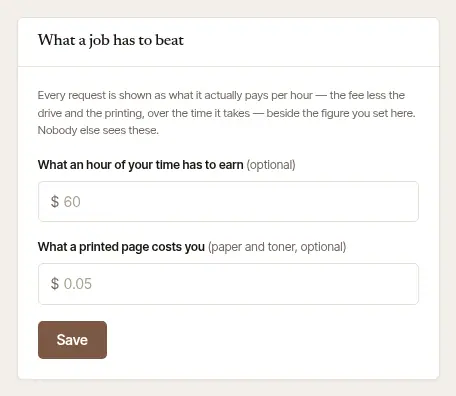
These two figures are yours alone: nobody else sees them. With them, every request and order shows what it actually pays per hour: the fee, less the drive and the printing, over the time it takes. That's shown beside your target, so a low-paying job is plain before you say yes.
Fill in What a job has to beat. Under the fees: What an hour of your time has to earn, and What a printed page costs you (your paper and toner). Both are optional.
Choose Save.
Your target is also what a company's order is measured against when you name a fee of your own, and what Say yes for me goes by.
General information, not legal advice
The most a notary may charge for each act, and what counts as a separate fee, are set by each state. The limits built in are general information drawn from each state's own rules, not legal advice. The fee schedule is made from your fees and your state's rule as it is built in here; whether a printed or on-screen sheet is the schedule your state asks for is a question for the office that commissioned you. A limit is applied to an act where your state sets one and we have established it — whether or not an attorney has reviewed that state's rules yet; an act whose limit we have not established says so under its fee, and nothing is refused for it. None of the state rules built in names a no-show or a late-cancellation fee, so neither is capped here. A no-show's trip fee is a travel fee, though — so in a state that limits travel fees, that limit applies to it. Where that limit is a figure, each signing's travel is charged at no more than it, the form holds your zones to it in the state whose commission runs longest, and a no-show fee above the limit for a job's miles is charged at the limit when you close the job out; where the limit is said in other words (an hourly rate, “actual and reasonable”), nothing is checked for you. Where your state limits or conditions travel fees (agreed in advance, at a mileage rate), the form says what your state's rules say. Your state's notary handbook, or a lawyer, has the last word. Settings → State rules shows the rules as the app applies them.
Was this helpful?
Still stuck? Contact support — a person reads every message and answers by email.