Guide
Tell the signer you're on your way, and mark each step
On my way, I'm here, Signing started and Signing done on the phone — the text to the signer, Undo, the lock screen, proof photos, no signal — and the first two on the web.
Four taps on the phone follow a signing from your driveway to the last page: On my way, I'm here, Signing started and Signing done. Each one is stamped on the job with its time — proof you were on time, and the start of any waiting you bill. They're made in the phone app, the same way on Android and on an iPhone, and the web shows them on the job. The first two can be made on the web too, on the day of the signing: see On the web, below.
Step by step
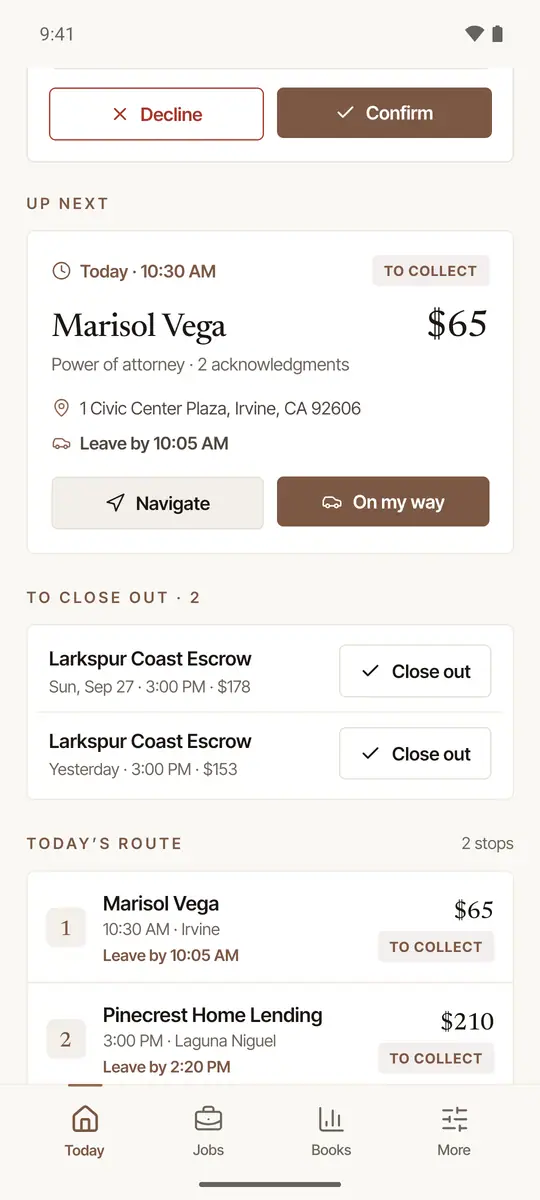
Tap Navigate, then On my way. On Today, the Up next card has Navigate (it opens your maps app — Apple Maps on an iPhone, Google Maps on Android, or the one you chose under More → Settings → Directions in, with directions to the address) and, beside it, the next step. When you set off, tap On my way. From the phone's position it works out when you should arrive: a client who asked from your page sees that time on their request's link. A bar then offers to text the signer — Text …: on my way, about … — one tap opens your messages, addressed and written. It stays at the foot of the screen until you tap Text, put it away with its ×, or move on (I'm here, or another screen) — take your time getting settled in the car. For a person you booked yourself, the text carries their page's link, where they see that time too.
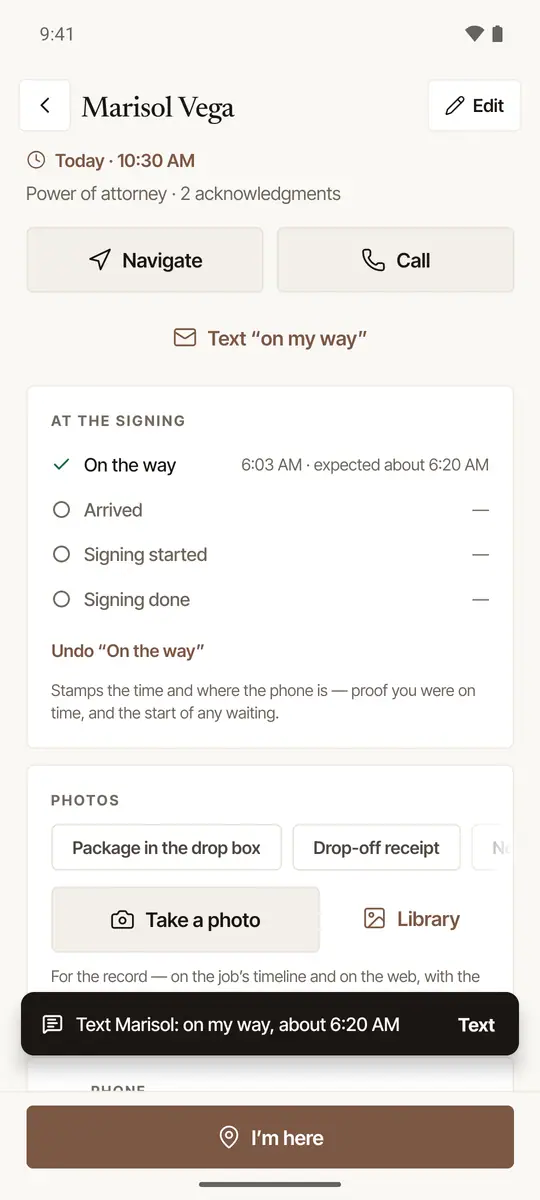
Tap I'm here when you arrive. It stamps the time and how far the phone is from the address — “at the address”, or so many meters away. Nobody there to sign? Under the steps, Signer didn't show closes the job out as a no-show: your arrival is the record (take a photo of the door too — Nobody answered the door, below), nothing is notarized, and the bill is your no-show fee instead of the signing — or your travel fee, if you haven't set one (it says so, with where to add one: Fees & rates on the web). See Close out a signing and get paid.
Tap Signing started when you sit down. If the signer kept you waiting, the minutes from the appointment time (or from when you got there, if you were late) are counted here, and close-out fills them in for you to check — and bills them if you've set a waiting fee; with none, close-out says so beside the minutes.
Tap Signing done when the last page is signed. The button then becomes Close out (Close out and collect, or Close out and invoice) — see Close out a signing and get paid.
The same steps are on the job itself, in At the signing: each with its time, the next one as a button, and a bar at the foot of the screen with the next step. Forgot On my way? I'm here is still one tap. From I'm here to Signing done the screen stays awake at the table.

Good to know
- Undo. A step tapped by mistake: tap Undo “…” under At the signing. Once the job is closed out, its steps are the record and can't be taken back.
- Hours early? Tapping On my way or I'm here hours before the signing asks first (On your way already?) — you may have the wrong job open. The steps open on the signing's day.
- Long past the job's time? A client who asked from your page and ticked the box for texts is texted when you tap On my way — but Hand & Seal texts nothing about a signing more than a day after its time on the job. If the signing moved and the job didn't, move the job to its new time first (Change time on the web, Move… in the app).
- By themselves. With Steps by themselves on (Settings → Notifications), On my way is made when you tap Navigate close to the time to leave, and I'm here when a recorded drive parks at the address around the signing's time. Each shows at once, with Undo; one made by itself never texts anyone.
On the web
Working from a browser? On the day of a signing you go to, its page under Jobs has Today's signing at the top, with On my way and I'm here. They're the same two steps the phone app makes. A client's page for the signing says when you set off, then when you got there; the order on a company's desk says you're on the way, then that you've arrived.
- No expected time. A browser gives no location, so nothing is said about when to expect you: their page says when you set off. Nothing about where you are is sent or kept.
- The text. A client who asked from your page and ticked the box for texts is texted when you choose On my way, as from the phone. Where a text will go, the line under the buttons says so before you press.
- Hours early? More than two hours before the signing, a press of either asks first (On your way already?, or There already?).
- Undo. Undo On my way or Undo I'm here takes the last step back, and their page goes back with it. A text that went can't be taken back.
- Signing started and Signing done are made in the phone app, at the table. On the web, close out after the signing as usual.
The buttons are there for a booked signing in person that's yours, on its own day — from twelve hours before its time — until the signing has started. On my way isn't offered once the signing's time has ended.
On your lock screen
From On my way to Signing done, the signing stays on your lock screen, with the next step as its button.
It's a notification — on Android 16 and later, a live update. Its button makes the next step right there, with the app closed: I'm here, Signing started, Signing done. Undo, beside it, takes the last step back.
It's a Live Activity: on the Lock Screen, and in the Dynamic Island on an iPhone that has one. It names the signing by its time, never by the client, and counts the time since the last step. Its button — I'm here, Signing started, Signing done — opens the job in the app, which makes the step.
It starts when you make a step with the app open — or open the job, once a step is made — and it needs Live Activities left on for Hand & Seal in your iPhone's Settings.
An I'm here made by itself may wait until you unlock the iPhone and open the app. It still carries the time you parked.
No signal
A step, a photo or a receipt made with no connection is kept on the phone and shows waiting to send. It goes by itself once you're back in signal, with the time you tapped it — not the time it was sent.
Proof photos
Under Photos on the job, choose what it shows — Package in the drop box, Drop-off receipt, Nobody answered the door or The building on arrival — and tap Take a photo. It's kept on the job with its time and place, and shows on the web under Photos. Tap a photo to see it, change its label, or remove it.
Call or text from the Jobs list
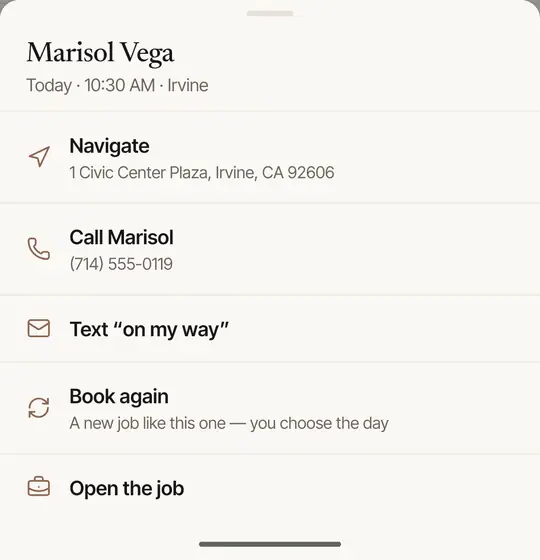
On Jobs, press and hold a signing: Navigate, Call the signer, a call to the client, Text “on my way”, Close out (once it's over), Book again and Open the job — without opening it. Where nobody has said a request is theirs, it says so beside the call; where its sender said they didn't send it, and the phone has the job, it offers no call or text from the request.
Was this helpful?
Still stuck? Contact support — a person reads every message and answers by email.