Guide
Accept or decline a request
When a client asks for a time from your page, you decide — with what it actually pays for your time and whether it fits your day in front of you — and the client is told.
Someone found your page and asked for a time. The time is held for them while you decide: it's yours to accept or decline, and they're emailed your answer. Nothing is booked until you accept.
On the web
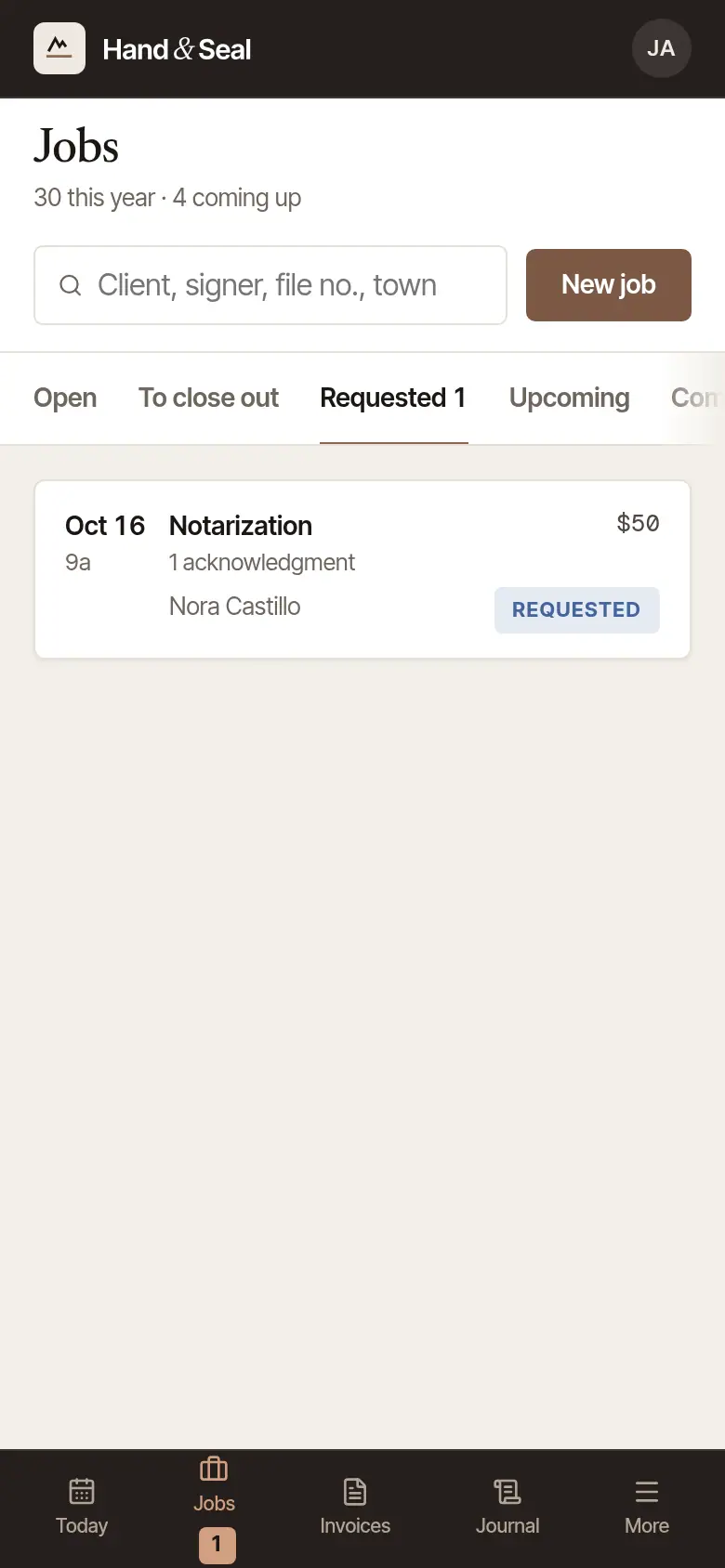
Find the request. It's the first thing under Needs you on Today, and on Jobs → Requested, where the tab counts what's waiting. Choose it to open it.
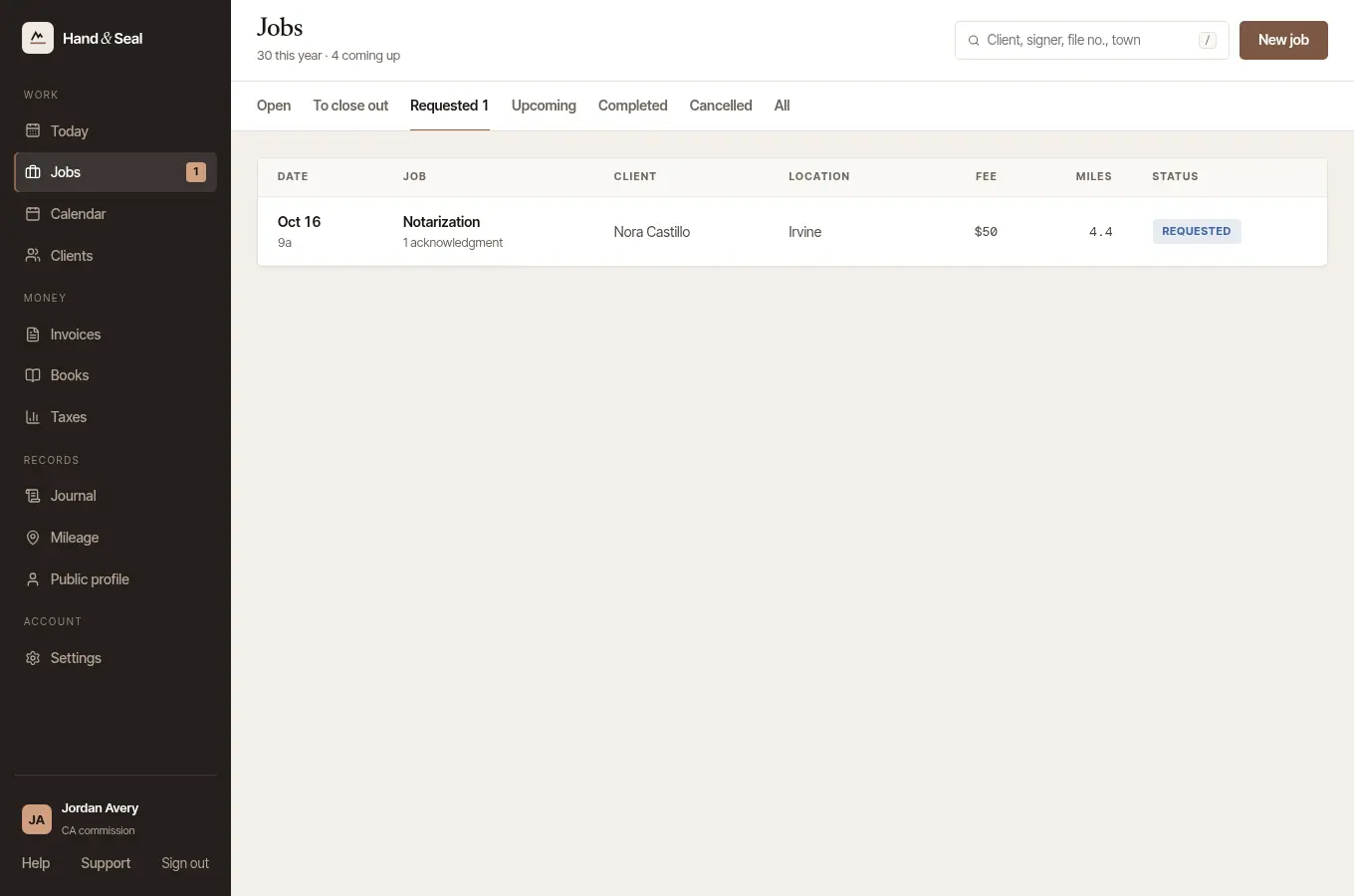
Check the travel. A request is priced with the drive from near your home base, measured by road. If the drive couldn't be measured, the job takes the same estimate your page showed the client — from the middle of your town to the middle of theirs — so your total and their estimate agree. The job says The distance is an estimate, and its travel line says estimated; inside your own town it says within the town, not a number of miles. Choose Measure by road, or type the Miles (and Minutes, if you like) and choose Price the travel, and that replaces the estimate. Two cases still arrive with No distance yet, so no travel fee: an address the map couldn't place, and one farther than you travel — your page showed them no travel figure either. Give those a distance the same way, before you accept at the wrong figure. And where your state limits a travel fee by the mile, an estimate prices no travel at all: the job says so, and asks for the miles.
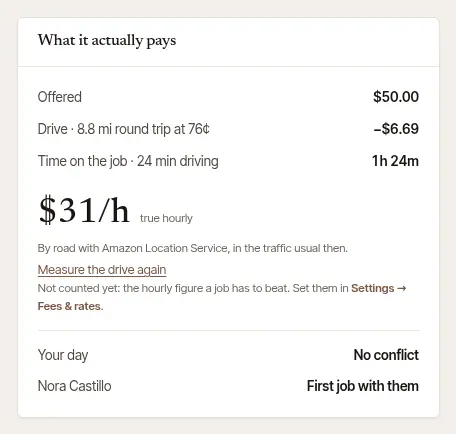
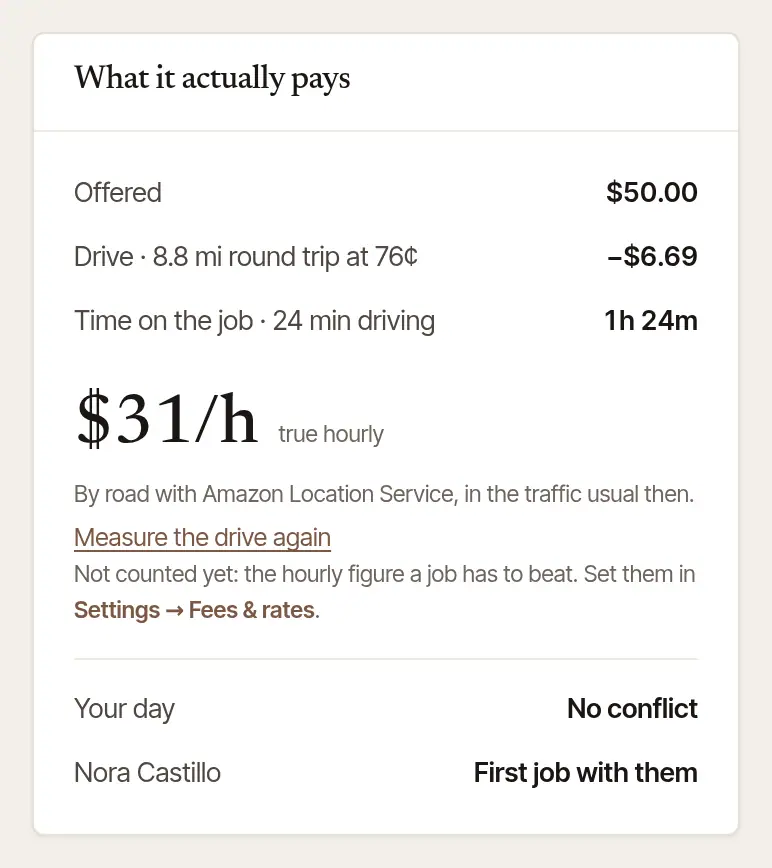
See what it actually pays. What it actually pays takes the cost of the drive and the printing off the fee, counts the time on the job with the driving, and gives what's left as an hourly figure (true hourly). With your target set — Settings → Fees & rates, under what a job has to beat — it says Above your target or Below your target. Under it: Your day — whether it fits, from the signing before to the one after — and the client's record with you.
To take it, choose Accept and confirm. That books it: the client is emailed the confirmation, and the job page says when it went. More than $10 above the estimate? Your page's form showed them an estimate. If your total is more than $10 above it — the drive was farther, or you added a fee — the job says so before you accept: the client is asked first. Their confirmation and their page show the new total with a button to agree to it — I agree to the price, including the … travel fee, or OK where it has no travel fee — and Call me; the booking stands either way, and they can still cancel. The job then says Waiting for …'s OK, that they said yes, or that they asked you to call — with their number — and you're alerted when they answer. The travel fee they agreed to. Your form shows the travel fee to their address on its own line, says what it is — separate from the notary's fees, in your state's own words where it has them — and that sending the request agrees to it. The job keeps that: “Travel fee of $45 agreed by … when they asked”, with the day and time. If the form showed them none — it couldn't place their address, or they asked several notaries at once — the job says so before you accept, and accepting asks them to agree to yours on their page.

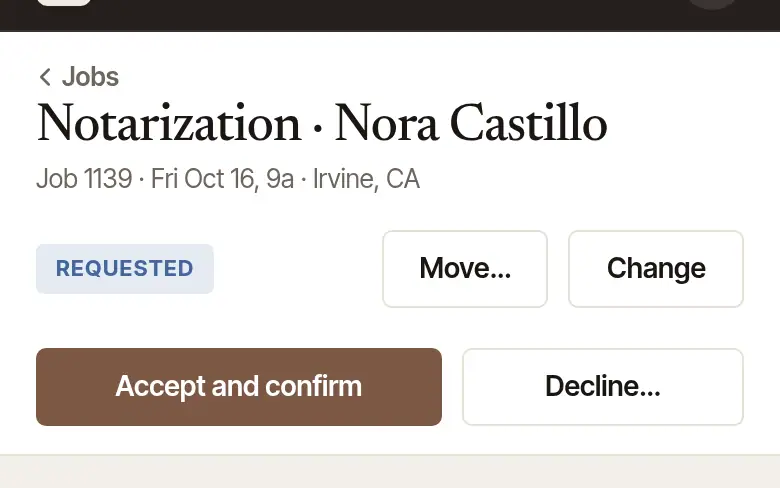
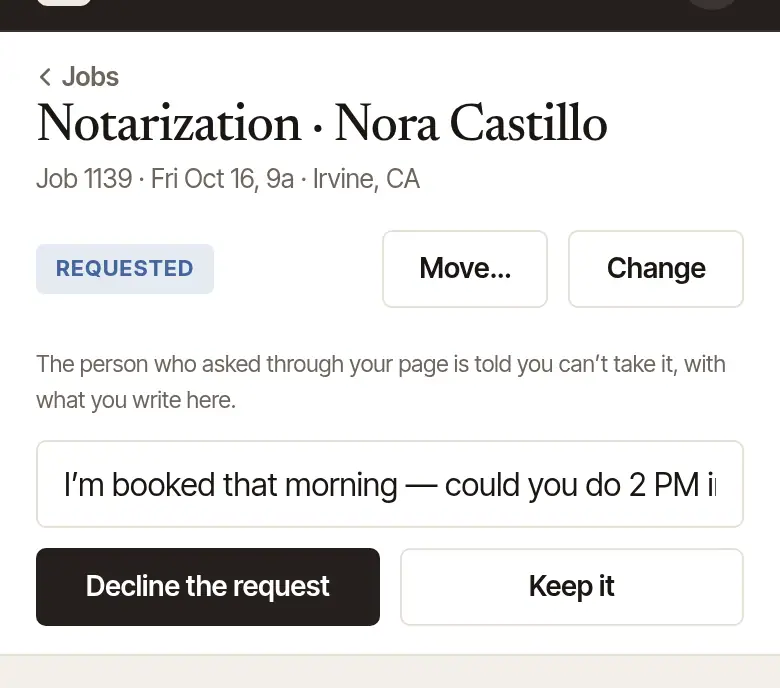
To say no, choose Decline…. It opens a step and sends nothing yet. Above the box it says who is told — the person who asked through your page (or through another notary’s page in your business: it names whose), with what you write. Write in Anything to say? Another time that works… if you like: “I could do 2 PM instead” goes to them with the no. Then choose Decline the request — or Keep it if you changed your mind. The time is free again.

On the phone
Find it on Today. New requests are under Requests (it says how many are new), and on Jobs → Requests. Each card has the time, who, what they need, the fee and the address — and any deposit they left, and their instructions (tap them to read them all).
Check what it pays. The card gives the hourly figure, above or below your target, and whether it runs into another signing; tap Details for how it's worked out. With no distance yet, tap Measure by road, or type the Miles and tap Price the travel. A request whose drive couldn't be measured says (town to town) under Miles: an estimate, with its travel priced from it — tap Measure the drive again to replace it.
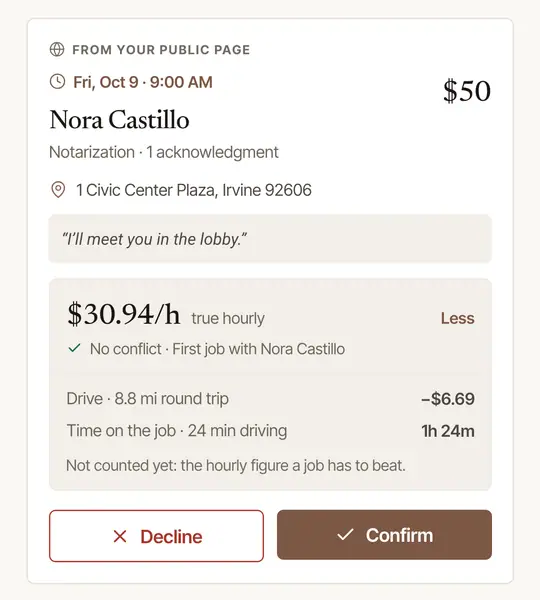
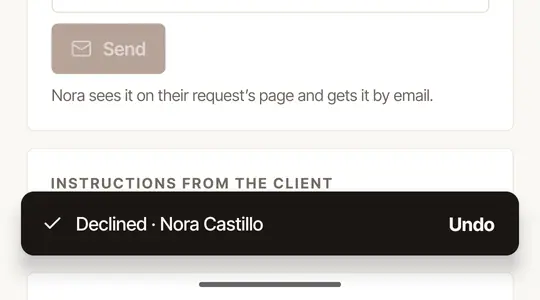
Tap Confirm or Decline. A decline waits a few seconds with Undo before it goes. You can also open the request and answer from its own screen. On a request from your page that's waiting for your answer, where No more from this sender is offered (see below), Decline opens a step first: tick the box that begins No more from this sender to refuse whoever sent it, then tap Decline the request — or Keep it if you changed your mind. On the phone, it always leaves out an email address or phone number on your client records. The box is never ticked for you, and it's unticked again each time you tap Decline, or if its words change before you send it. Ticked, the bar with Undo says no more from this sender for its few seconds. If your no refused less than the box said — nothing was left on the request to refuse, say — you're told exactly what it did in a message once its answer has come back, while you're still signed in.
Good to know
- The time is held two days. A request waits two days for your answer — or, when its time is sooner, until an hour before it (halfway there, for one sent less than two hours ahead), so the client hears in time to ask someone else. On the web, Today says when, under a request asked of you alone: Answer by …. The notification and the email that tell you of it say until when, and so does the request's page on the web: Held until … — unless they asked several notaries at once: those say the first to accept takes it, and name no time. Unanswered, it's marked Expired, the time is free again, and you're told on your phone — in place of the notification that asked you, unless it has been handed on in your business: then whoever has taken it on is told instead — or, while nobody has, the business's owners (you, if you run it). The client is emailed that it lapsed if they gave an email address; with a phone number only, nothing is sent to them, and their request's page says so. Someone who asked several notaries at once is written to once none of them is left to answer.
- A deposit. If you take deposits, one held on the client's card is charged when you accept, and let go when you decline.
- Questions first? Write to the client under Messages on the request before you answer: Message a client about a signing.
- A request in the name of a client you have. Anyone can type a name and an email, so a request never goes on a client's record by those alone. It stays on a client of its own, with only what was typed on it, so Today's Confirm tomorrow's signers goes by what was typed on the request, not by your client's record. That line says They haven’t confirmed this request from their email until someone does — the person who asked, by pressing Yes, this is my request in the email sent to that address. A request that gave no email address was sent no such email, so the line isn't there. (The phone app's words for it are Nobody has said this request is theirs.) When its name and email match a client of yours, the email telling you of it says so, and on the web the job says This looks like …, a client you already have, and that it isn't confirmed. It joins your client when someone presses Yes, this is my request from the email sent to that address — before or after you accept, unless you've already filed it yourself, or changed or billed the client it made. If you know it's them, press It's them: file it under … on the web, or choose them under Edit: that's your word that it is. Today's confirmation and what you bill then go to your client's record, with the request's time and place, and They haven’t confirmed this request from their email stays until someone does. The button won't file a job with an invoice on it: an unpaid invoice can be voided first.
- “From a request, not confirmed.” A client that only a request made says so, in Clients and wherever you pick a client, on the web and on the phone, so one person can show twice until it's filed. A booking you type with its name or address is never filed under it by itself: you're asked which it is, or to add a new client, and you're shown the number and email it holds. If you typed another, the question says both. What you type beside it goes on the record in place of what was typed on the request, and your booking goes by that, on the web and on the phone. It stops being marked once you book it or change it, an import fills it in, or someone says the request is theirs. A no-show or a signing on it doesn't do that: an ID shows who signed, not whose the email or number is.
- “The person at this email says they didn't send it.” Someone who gets the email about a request they never made can say so from its page. You're told on the job, and by email while your email alerts are on, and the email address and phone number typed on the request are taken off it, and off any signer or person to call on the job with the same one, and you're told. They come off the client record made for it too — accepting a request, this one or another filed under that record, doesn't keep them there — unless you've since made a booking of your own on that record, billed it, finished a signing on it or filled it in from an import: then it keeps what's on it, and you're told so. A request still waiting ends, and the time is free again; whoever asked isn't told why. One you've accepted stays on your calendar until you cancel it, and Today won't offer to confirm with them. If it's filed under a client of yours, that record keeps what's on it: a price or an invoice you send still goes there, and automatic invoice reminders for this signing stop. A review left on that signing stays on your page without the name on it, and you're told: report it if it isn't from a client of yours. If your reply to it has a word of the name typed on the request, your reply comes off your page, and you're told: you can write it again without it. A word of the name counts when it has four letters or more, in capitals or not, accents aside — or two or three letters with a capital first letter, or in a script without capitals, unless it sits among words written in capitals, as in “MY PLEASURE”. Each part of a hyphenated name counts on its own. A title or an initial doesn't count, nor does a joining word such as “de”, “van” or “and”, unless it starts the name with a capital, as in “Al Green”. A nickname, a name written another way, or a two-letter name typed without its capital isn't caught: check your reply. On the phone the same note is at the top of the job, and the job offers no call or text to the request's address or number, only to a signer you typed yourself. You can still write to whoever asked under Messages: it shows on their request's page. It's what that person said and no more: someone may have mistyped their address.
- Accepting says “We can’t tell which state this address is in”? Accepting checks the address against your commission, and this one doesn't say its state: it has no ZIP code and no state after its town, or a ZIP that doesn't fit the state written beside it. Add or correct the ZIP — with Edit, on the web or the phone — then accept, or decline it. An address in a U.S. territory, or a military one, can't be checked against your commission at all.
- Not the time you'd like? Suggest another under Messages before you answer, or in the box when you decline — or accept, then use Change time, which emails them the new time.
- To read what clients are sent, on the web open Settings → Account → What your clients get: the emails and texts a client is sent at each step of a request from your page or a signing you book for them, each as it would read for a made-up signing. Nothing there is sent. Not there: messages you write, your price, a deposit's receipt or refund, invoices, their receipts and refunds, a bank transfer that didn't go through, reminders and statements, what a company gets about its order, and the letters of a request sent to several notaries at once — nor what a deposit or a late-cancellation fee adds to these.
Stop someone who keeps sending made-up requests
If requests keep coming that aren't real, you can refuse whoever sends them as you decline one. On the web, in the Decline… step, tick No more from this sender, then choose Decline the request. On the phone, tap Decline, tick the box that begins No more from this sender, then tap Decline the request. It's never ticked for you, and it's offered on a request from your page that's waiting for your answer and has an email address or phone number on it — unless all it has is on your client records and it no longer holds its internet connection (see below). If there's nothing left on it to refuse when you send it, your no still goes, and you're told nobody was refused. A company's order has a tick of its own: see Which companies can send me orders?
- The email address and phone number on the request are refused for up to 30 days, from that moment — but not one on your client records, unless you choose to (below). A new request from your page with either of them is turned away. A phone number is matched by its digits however it's written, with any extension after it left off. A number that can't be anyone's isn't refused, and the tick doesn't offer it: ten of one digit, such as 000-000-0000, or 1234567890, 0123456789 or 9876543210, or a North American number whose area code or exchange starts with 0 or 1, such as 123-456-7890.
- What's refused is what was typed, which may be someone else's, so your clients are left out. If an email address or phone number on the request is on one of your client records, the tick says whose record it's on and leaves it out: it refuses the rest, but not that. To refuse it too, on the web, also tick the box beneath it that begins Also refuse, which names whose it is: it's never ticked for you, and it turns that client away too. Ticked without No more from this sender, it refuses only what it names. On the phone your client is always left out. If all the request has is on your client records, No more from this sender refuses nothing on it, but it still counts toward refusing its internet connection (below). Your client records are read when you open the request: those you can see, in each business you work in, that were booked, changed or imported there, or that have a signing of yours that took place, or an invoice. What the tick said when you opened it is what it does, even if a record changes before you send it. Someone who pressed Yes, this is my request isn't one of your clients by that alone.
- An internet connection is refused for one day, and only once you've ticked No more from this sender for two different contacts from it. What's refused from requests that share an email address or a phone number is one contact, and so is any joined through others that do. One of yours that the tick left out joins nothing, and a request it left all of out counts as a contact of its own. A connection can be a whole office's, a library's or a phone carrier's, so one contact never shuts it. Until the day is up, a new request from it is turned away, whatever's typed, unless you take it back. A request keeps its connection for a day or two, so one you decline after that isn't counted. Also refuse on its own doesn't count toward it.
Whoever is turned away is told “This notary is not taking requests through the platform at the moment.”, as anyone is when a page has stopped taking requests, unless something else stops the request first, such as a time that's gone. Nothing reaches you, no request is saved and no email goes. The person you declined gets your no as usual, and it doesn't say you refused them.
It stops what's new from your page: an order through your order link or to your orders address isn't refused by it. Requests they already sent stay yours to answer: tick it on those too. Someone with a new email address and phone number, on another connection, is a new person to Hand & Seal.
Your refusals are yours alone. They're only on requests to you: other notaries and companies get nothing from them, and they don't affect anyone's ranking or record. If you work in someone else's business, your list is your own and its owners and assistants don't see it. They can see on that job's timeline that you refused its sender, as they can see the rest of a job's timeline, and the business's download carries that line too. Whose client record the tick left out is shown to you alone, beside the tick: a no that refused nothing and only counted its connection puts no line on the job. A business never sees a refusal you made in another one: a take-out, or someone saying they didn't send a request, in a business ends only the refusals you made from its own requests, and only its own jobs say so.
See who you refused, and take it back
Open Settings → Integrations. Everyone you refused is under Senders you refused, by the name on the request and the day, with a link to the request. Once that request's details have been cleared, the entry no longer shows a name. A request whose contacts were all left out isn't there: nothing on it was refused.
To let someone ask again, choose Take back beside them, then Yes — they can ask again. For a connection it's Yes — that connection can ask again. Taking back a contact takes back every email address and phone number refused with it as one contact. If you take back one of the two contacts a connection was refused on, the connection is taken back too. A connection you take back is refused again only if you tick No more from this sender for two more contacts from it.
Each goes by itself when its time is up. An email address's refusal also ends if whoever has that address says they didn't send a request; a phone number refused with it stays refused. And what someone typed is refused no longer once they're taken out of a business's records at their request: see When someone asks you to remove their details. Either ends only what you refused from that business's own requests: one you made in another business stays until its time is up, or until you take it back. Neither ends anything else refused with them. A connection stays refused until its day is up, unless you take it back, and a contact whose refusal ended that way may still count toward its connection's two different contacts, at most until its 30 days are up.
If refusals can't be checked for a while, Senders you refused says so at its top: until they can, whoever you refused can send you requests.
Was this helpful?
Still stuck? Contact support — a person reads every message and answers by email.